A page with room to read.
Headings, tables, code blocks and task lists, with Find, Copy and text zoom. Reading leaves your Markdown untouched.
 Leaflit
A READING WINDOW FOR YOUR TERMINAL WORKFLOW
Plans, specs and notes deserve a readable page. Open Markdown in a dedicated macOS window, without bringing an IDE workspace along.
Get LeaflitFree & open source, Apple Silicon, macOS 14+
~/project $
leaflit ./plan.mdA file to read.
A window to read it in.
01 / THE REASON
“I wanted to open Markdown from my LLM terminal workflow without loading an IDE just to read it.”
That’s why I built Leaflit. The terminal is where the work happens. A rendered page is where a long plan, a table or a diagram becomes easier to review.
Leaflit gives that step its own window. Open the file, read the page, and return to the terminal when you’re ready.
02 / THE READING PART
One reader for the Markdown you already have.
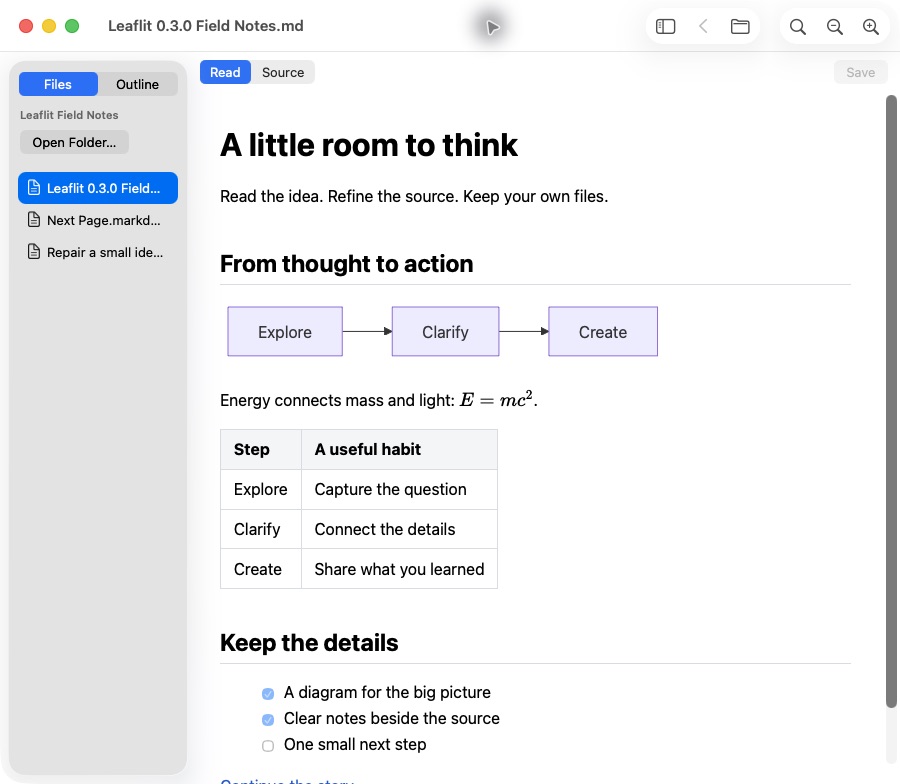
Headings, tables, code blocks and task lists, with Find, Copy and text zoom. Reading leaves your Markdown untouched.
Mermaid, KaTeX and fonts are bundled with the app. Rendering does not depend on a CDN. Local PNG and JPEG images stay local.
Saved changes refresh the page, including replacement saves. Follow relative document links, then use Back to return.
03 / BETTER TOGETHER
chda keeps worktree terminals and coding-agent status together.
After installing both apps, run this from a shell in the chosen worktree to open a plan or spec beside your terminal:
leaflit ./plan.mdKeep reading while the agent works. Leaflit follows saved changes, with Find, Outline, Mermaid and LaTeX math. Use Source for a small correction and save explicitly.
chda also offers a local browser preview for quick checks. Leaflit is an optional companion for Apple Silicon Macs on macOS 14+, and works with any terminal.
Explore chda and the workflow04 / BACK TO YOUR WORK
Install the app and its command with the personal Homebrew tap. Then open any local Markdown file.
0.3.0 preview, Developer ID signed and notarized
Apple Silicon, macOS 14 or later
Verified on Apple M3 with macOS 26.6.2. Earlier supported macOS versions remain unverified.
brew install --cask magicsih/tap/leaflitleaflit ./plan.mdNo account. No analytics SDK in the app. No changes to your default file association.
It means a dedicated reader with no editing workspace to configure. It is a product goal, not a promise that Leaflit uses less memory than every editor. The app uses WKWebView and its helper processes. Matched local 0.3.0 runs measured total process footprint medians of 130.6MiB in Read and 145.0MiB in Source after Read. Both used the same 100KiB document with math and Mermaid, three fresh runs per mode and native UI observation. These whole-state measurements include WebKit helpers; they do not isolate editor cost. The original 60MiB target was not met.
See the measured ranges, protocol and limits. Formula plain-text copying and ordinary Source dark appearance have open follow-ups. An initial blank Read capture recovered after Source-to-Read; the cause remains unconfirmed. Spoken VoiceOver, earlier macOS, actual Finder drops and network-isolated host execution remain unverified in GitHub issues.